
Our Blog
Enhance your WordPress W3 Total Cache Performance with APC
Author: Yazan Al-Sheikhly

Installing APC (Alternative PHP Cache) Can Enhance your WordPress W3 Total Cache Performance
This option really depends on the environment you’re hosted in and what kind of pages you’re serving. Typically, most websites are hosted in a virtual environment like our managed domains but may not have similar disk, CPU or memory resources that we deploy. If you have a good amount of CPU (1.5+ CPU cores) and 2 GB or more of RAM then I would recommend testing this method out.
Test out the APC Method to Determine if It Does Enhance W3 Total Cache Performance
We install APC (Alternative PHP Cache) on the cloud servers to allow the W3 Total Cache WordPress plugin better work its magic for high traffic WordPress blogs. The result is more pages, images and web components are cached in memory for quicker response times to the end user. When your WordPress website receives an influx of traffic, it’s much faster for the server to retrieve that data from memory than disk – this is typically the source of bottlenecks for the majority of WordPress Sites.
Installing APC (Alternative PHP Cache) using WHM Control Panel
1. Log in to WHM as root.
2. Click on Software.

1. Click on Module Installers

1. Click the Manage link in the PHP Pecl row

1. Search for ‘APC’
2. Click the Install link under the Action column next to the APC Module Name (description is Alternative PHP Cache).

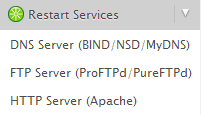
1. Once that has been configured by the control panel, restart Apache by clicking on Restart HTTP (Apache) under Restart Services in the control panel.
1. Under the General Settings tab for the W3 Total Cache plugin, update the cache methods to reflect Opcode: Alternative PHP Cache (APC).
Install HTML Tidy Extension for Cleaner Code
1. Log in to WHM as root.
2. Click on EasyApache.
3. Go through the wizard until you reach the list of PHP modules/options.
4. Click on the Exhaustive list of options at the bottom.
5. Check the box next to Tidy.
6. Build Apache.
7. PHP and Apache will be rebuilt and restarted for your use.
Configure WordPress Plugin – W3 Total Cache
1. Log in to WHM as root.
2. Click on EasyApache.
3. Go through the wizard until you reach the list of PHP modules/options.
4. Click on the Exhaustive list of options at the bottom.
5. Check the box next to Tidy.
6. Build Apache.
7. PHP and Apache will be rebuilt and restarted for your use.
Configure WordPress Plugin – W3 Total Cache
At this point, you should configure your W3 Total Cache WordPress plugin to use Alternative PHP Cache for all components.

Author
Yazan Al-Sheikhly
Entrepreneur, leader and self-proclaimed chef. Educated in Waterloo, Ontario – BSc in Computer Science and BBA (Business Administration). Founded a cloud computing company in 2007 and co-founded other high-tech ventures. Waterloo is the northern Silicon Valley where the technical talent is flourishing and the start-up atmosphere is explosive. Connect with me on social media!!
- APC W3 Total Cache, cPanel Alternative PHP Cache, cPanel APC install, cPanel HTML Tidy, cPanel PHP Tidy Install, WordPress PHP Cache, WordPress W3 Total Cache
- Cloud Hosting
- 0 Comments
Related post
Optimize Your WordPress Website – Make your Website Load Faster
Installing APC (Alternative PHP Cache) Can Enhance your WordPress W3 Total Cache Performance
Installing APC (Alternative PHP Cache) Can Enhance your WordPress W3 Total Cache Performance
This option really depends on the environment you’re hosted in and what kind of pages you’re serving. Typically, most websites are hosted in a virtual environment like our managed domains but may not have similar disk, CPU or memory resources that we deploy. If you have a good amount of CPU (1.5+ CPU cores) and 2 GB or more of RAM then I would recommend testing this method out.
Test out the APC Method to Determine if It Does Enhance W3 Total Cache Performance
We install APC (Alternative PHP Cache) on the cloud servers to allow the W3 Total Cache WordPress plugin better work its magic for high traffic WordPress blogs. The result is more pages, images and web components are cached in memory for quicker response times to the end user. When your WordPress website receives an influx of traffic, it’s much faster for the server to retrieve that data from memory than disk – this is typically the source of bottlenecks for the majority of WordPress Sites.
[4229]Dewaslot88 | Login Resmi Link Alternatif Slot Gacor Hari Ini,dewaslot88 menyediakan akses link alternatif terbaru untuk daftar casino online terpercaya dengan kemudahan cara deposit via dana. Segera bergabung sekarang juga. visit: dewaslot88
[9258]Nagitatogel | Login Resmi Link Alternatif Slot Gacor Hari Ini,Nagitatogel menyediakan link alternatif terbaru untuk akses mudah. Nikmati kemudahan judi online deposit dana dan panduan cara main togel online. Daftar sekarang juga! visit: nagitatogel
[3518]je77 Official Login | সেরা অনলাইন ক্যাসিনো ও দ্রুত টাকা উত্তোলন,je77 অ্যাপ ডাউনলোড করে সেরা অনলাইন ক্যাসিনো গেম এবং স্লটস খেলার নিয়ম জানুন। দ্রুত টাকা উত্তোলনের সুবিধায় আজই লগইন করে যাত্রা শুরু করুন। visit: je77
[2157]Hoki88 | Login Resmi Link Alternatif Slot Gacor Terpercaya,hoki88 menyediakan akses link alternatif terbaru untuk judi casino online terpercaya. Nikmati kemudahan cara deposit via dana yang cepat. Daftar dan mainkan sekarang! visit: hoki88
Found this site through a friend and I am glad I did. The rewards system is very motivating. Give phjilibbcom a try!
Best Jili experience I have had in a while. The bonuses are generous and the loading speed is impressive. Highly recommend ph991jili to everyone looking for big wins.
[5076]Netbet বাংলাদেশ: লগইন ও বিকাশ দিয়ে ক্যাসিনো ডিপোজিট গাইড,netbet-এ সহজ লগইন করুন এবং বিকাশ দিয়ে অনলাইন ক্যাসিনো ডিপোজিট করে সেরা অনলাইন স্লট গেম সাইট উপভোগ করুন। আজই অ্যাপ ডাউনলোড করে খেলা শুরু করুন। visit: netbet
The login process is quick and the security feels solid. I appreciate how straightforward everything is without too much clutter. Glad I found 11ccbetlogin.
Honestly the best gaming site I have found in the Philippines so far. Great bonuses and the customer support is actually helpful. Give phcrownph a go, you won’t regret it.
Logging in is a breeze and the account management is very straightforward. No stress and no hassle at x555comlogin. Keep it up guys.
Learned a lot here, the part about peptide research was backed by solid info, looking forward to more posts like this.